Who should get this
A smart garage-door controller is an add-on that works with your existing garage-door opener, letting you control the door from anywhere through an app on your smartphone, tablet, or computer. It does not replace your existing garage-door opener or prevent other devices that open your garage door—such as visor clips, push buttons, and keypads—from working as before.
A smart garage-door controller is an excellent security and access tool for your home, vacation home, or rental property. An estimated 71 percent of American homeowners use the garage door as the main entry point to the home, and being able to open and close it remotely is very convenient. For example, if you or another member of your household often forgets to shut the garage door while driving away, a smart garage-door controller will tell you it’s still open and let you close it remotely. Geolocation features can also automatically shut it for you, so you don’t need to worry at all. The device will also give you a heads-up if you leave the door open when you come home, or if it’s open when it shouldn’t be, so that you can close it from wherever you are, even if that’s just the couch. You can view the status of your garage door at any time, so you can be sure your home is safe and secure.
These devices also offer a simple, convenient way of granting people access to your house when you’re not present. The Gogogate2 in particular caters to rentals and condominiums with a feature that lets a landlord assign an unlimited number of access “keys,” useful if you live in an apartment complex with a shared garage.
All the controllers integrate with home-automation systems, and some do so with individual devices such as lights, thermostats, cameras, and locks. But you don’t have to be fully invested in home automation for a smart garage-door controller to be useful—it’s a simple, entry-level item that can make your life easier. Most are easy to install and easy to use, and don’t require additional hardware to operate. So you can just buy one, plug it in, and start controlling your garage door remotely.
If you’re shopping for a whole new garage-door opener, you can now buy all-in-one smart garage-door openers from Chamberlain and LiftMaster with Chamberlain’s MyQ technology built in. Gogogate2 has partnered with Sommer to offer an opener with its tech incorporated (currently available from The Home Depot). Linear offers a smart opener that works with Alexa, Google Assistant, and IFTTT (both Linear and LiftMaster are sold only through dealers). But if your garage door is already opening and closing fine with its existing opener, and you just want to add some smart features, a smart garage-door controller is the right choice for you. Such a device typically costs between $80 and $150.
How we picked and tested
We scoured Amazon, Google, and tech-review sites to compile a list of the smart garage-door controllers currently available. We came up with five models to test and put through their paces using four garage-door openers:
You’ll also find a few Bluetooth smart garage-door openers, including gLink and SecuRemote. But Bluetooth’s range is limited, so with these controllers you can control your garage door only from within or near your home, as you do with your regular garage-door opener remote.
All of the smart garage-door controllers we tested performed well in opening and closing the doors remotely, offered notifications if we left the door open, and allowed us to close the door through the companion app. We focused our testing on how easy each controller was to work with, both in installation and setup and in everyday use (it had to be easier than just pushing the visor button!), as well as on which features were available beyond just allowing you to open and close the garage door remotely. We also spent time exploring integrations with other home-automation devices to see how much added value those brought.
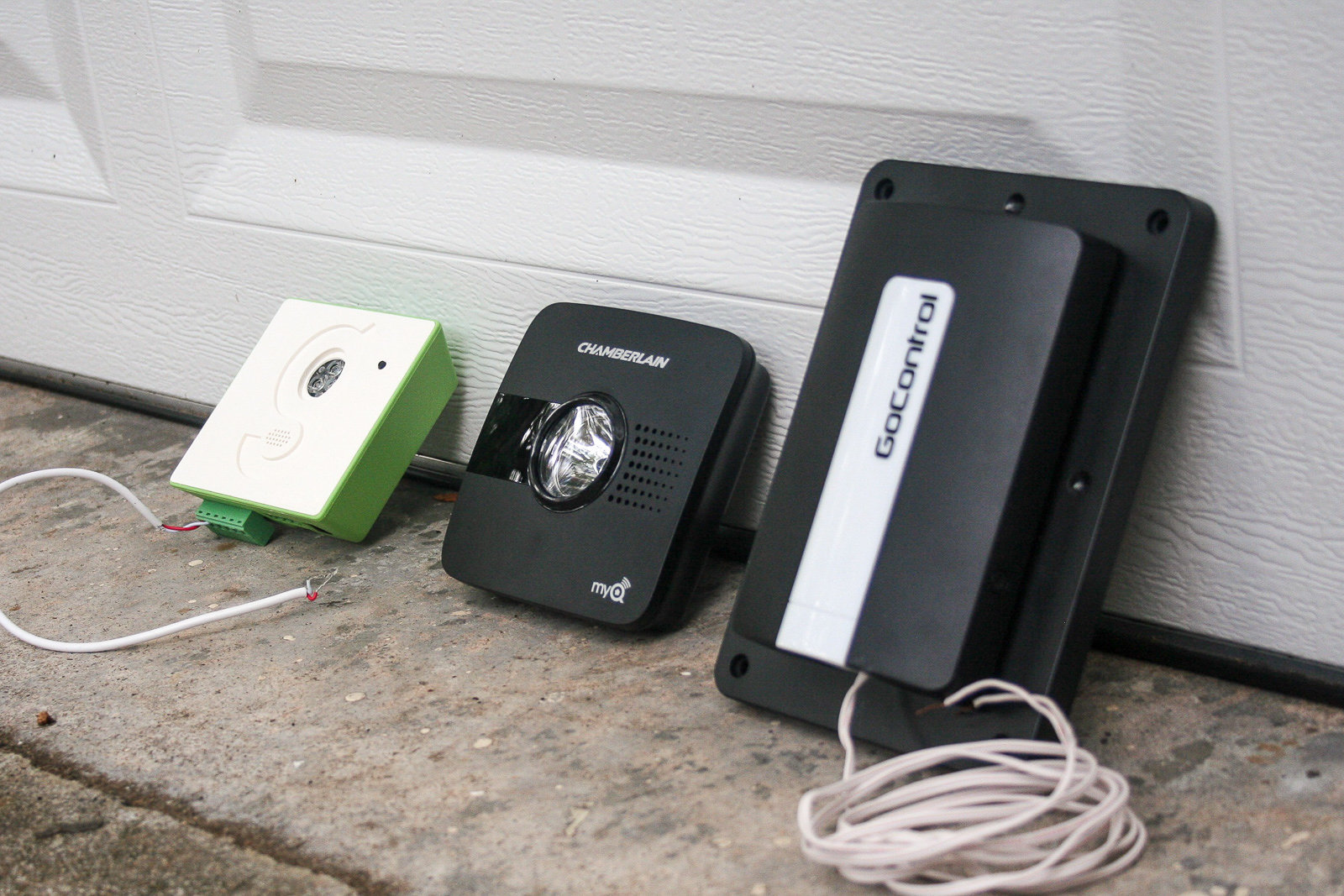
From left to right, the Gogogate2, Chamberlain MyQ Garage, and GoControl. Not pictured here is the Garageio. Photo: Jennifer Pattison Tuohy
Finding a compatible controller for your garage
Not all smart garage-door controllers will work with all garage-door openers. And contrary to what you might normally expect with technology, the newer your door opener is, the less likely it is to work with the majority of replacement garage-door controllers.
If you plan to buy a smart controller, check its compatibility with your garage-door opener first, and if you can’t find your exact model listed as compatible or noncompatible at the below links, try to contact the company’s support before purchasing to be sure your model will work.
To test all of our chosen controllers, we had to use four garage-door openers: the Legacy Overhead Door Opener (for the Garageio), the LiftMaster 8365, MyQ enabled, 2016 (for the Chamberlain MyQ Garage), the LiftMaster Professional Formula 1, 2011 (for the Gogogate2), and the Linear Garage Door Opener, 2016 (for the GoControl).
As a general rule, here is how you can tell which controller your garage-door opener will work with:
- If your garage-door opener was manufactured between 1993 and 2010 and has infrared safety sensors installed, it should work with any of these replacement devices.
- If your door opener does not have safety sensors (most likely because it was manufactured before 1993), it will not work with the MyQ Garage but will probably work with the GoControl, Garageio, and Gogogate2, because those wire directly into the opener.
- If your door opener was made toward the end of 2011 or later and is a Chamberlain or LiftMaster (or branded under one of the company’s many OEMs), it is probably compatible only with the MyQ system.
To check the compatibility of your door opener with the models we tested, you can consult the lists posted for the MyQ Garage (Chamberlain models; for LiftMaster models, go here), the GoControl, and the Garageio. The Gogogate2 is compatible with all garage-door openers except Chamberlain, LiftMaster, and Craftsman openers with MyQ technology (built-in or enabled) or using Security+ 2.0 wall push buttons.
Why do the newer Chamberlain/LiftMaster openers not work with smart controllers other than MyQ? Because, according to the competition, Chamberlain doesn’t want them to. “Chamberlain (who owns nearly 60% of residential market) is making their new openers (2011 and above) non compatible with us and the rest of the competition in this segment,” wrote Juan Roca Arderiu, operations and sales manager for Gogogate2, in an email interview.
Chamberlain says it launched a patented radio-encryption method in late 2011 that has been embedded in every opener manufactured since then. We asked the company why this change was necessary, given that it apparently broke compatibility with third-party openers. The response was: “This updated encryption provided a new level of safety and security to consumers. Of course third parties are welcome to partner with Chamberlain.”
Another potential compatibility issue is with single-panel flip-up doors. The manuals for both MyQ and GoControl state that the tech is designed to work only with sectional, roll-up doors. This is because single-panel doors typically do not require a garage-door opener. The Gogogate2 is the only model we tested that promises to work with flip-up doors connected to a garage-door opener, though anecdotally we’ve heard of people being able to get MyQ to operate their flip-up door connected to an opener.
All the models we tested will control more than one garage door—up to three in most cases, if you purchase another door sensor (usually around $35) for each additional door.
Our pick
The Chamberlain MyQ Garage (MYQ-G0301) is the leading smart garage-door controller available, largely due to the huge popularity of Chamberlain garage-door openers (and those sold by its professional install brand, LiftMaster). The MyQ was the first smart garage-door controller to be manufactured, and it’s one of the simplest smart-home devices to install and set up. If you are looking for a way to control your garage door remotely and check on its status, and would like integration with major smart-home systems such as HomeKit, Wink, IFTTT, and Google, the MyQ Garage is the best option.
In our tests, the install took under 15 minutes, with the only pain point being drilling some screws into the garage ceiling for the mounting bracket. First we mounted the door sensor to the door itself, using the included Velcro strips (you can use screws if you prefer), after which we attached the bracket for the main unit to the ceiling, near the door and near an outlet, using screws. We then slid the MyQ Garage into the bracket, plugged in the power supply, and proceeded to connect it to Wi-Fi with a smartphone and the free MyQ app. It really is a plug-and-play device, and it’s the only model we tested that doesn’t require any wiring, so you have no need to mess with your breaker. You will need a smartphone, Android or iOS, to set it up, and if you have poor Wi-Fi reception in your garage, you may need to purchase an extender, but the MyQ Garage does a pretty good job with a weak signal. We contend that anyone can set up the MyQ Garage in 15 minutes, as long as they’re handy with a drill.
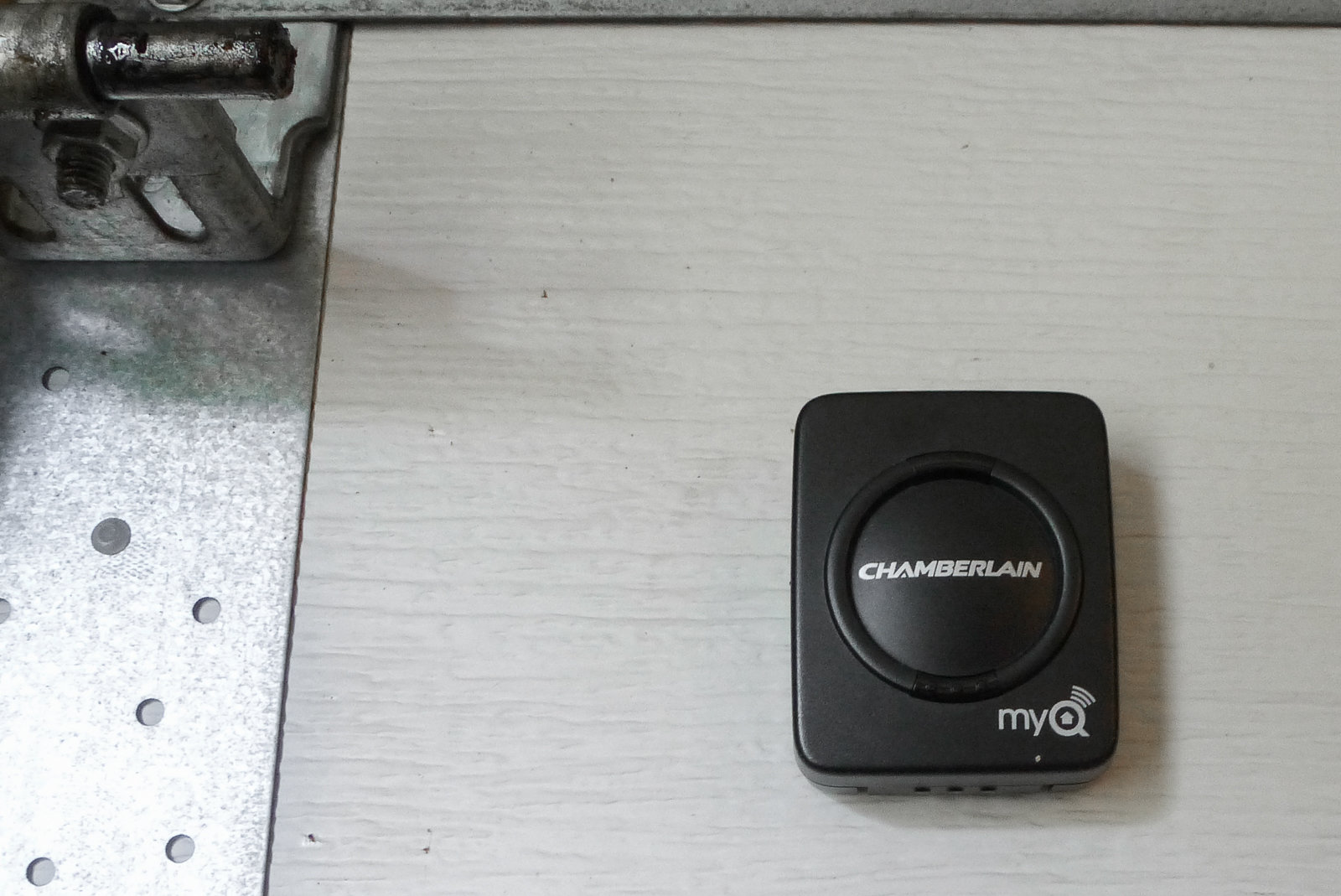
The MyQ door sensor mounts on your garage door with double-sided tape and detects whether the door is open or closed. If you have more than one door, just add another sensor to that door. Photo: Jennifer Pattison Tuohy
Once installed, the MyQ Garage lets you open and close the door through its app from wherever you are. You tap the graphic of a closed garage door to open, and on the image of an open door to close. When you open the app, the graphic reflects the current state of your door and how long it has been in that state in minutes and hours. The device also emits warning beeps and flashes an LED light when the door has been triggered to close remotely (but not when opened). This feature is important for alerting someone in the garage when it is being closed remotely, and is a UL requirement for “unattended operation” of garage doors.
Within the app you can create as many customized alerts as you want for when the door is open and closed, and when you are alerted about it via push notification or email. Two especially useful alerts can notify you if the door has been left open for longer than a specified amount of time and inform you of the status at a particular time—say, between 7 p.m. and midnight. You can also set schedules to close the door at a specific time on specific days; however, in our testing, we could never get the schedule to set in the app. Chamberlain says this is a known issue and it is working on a fix. In the meantime, if you have the MyQ Home Bridge, (discussed below), you can set this type of schedule through Apple’s Home app. The MyQ app also provides a full history of the activity of the door and allows you to add doors from different homes. Security features include the option of enabling TouchID (for iPhones) or a passcode to log in to the app, access the account, or open the doors.
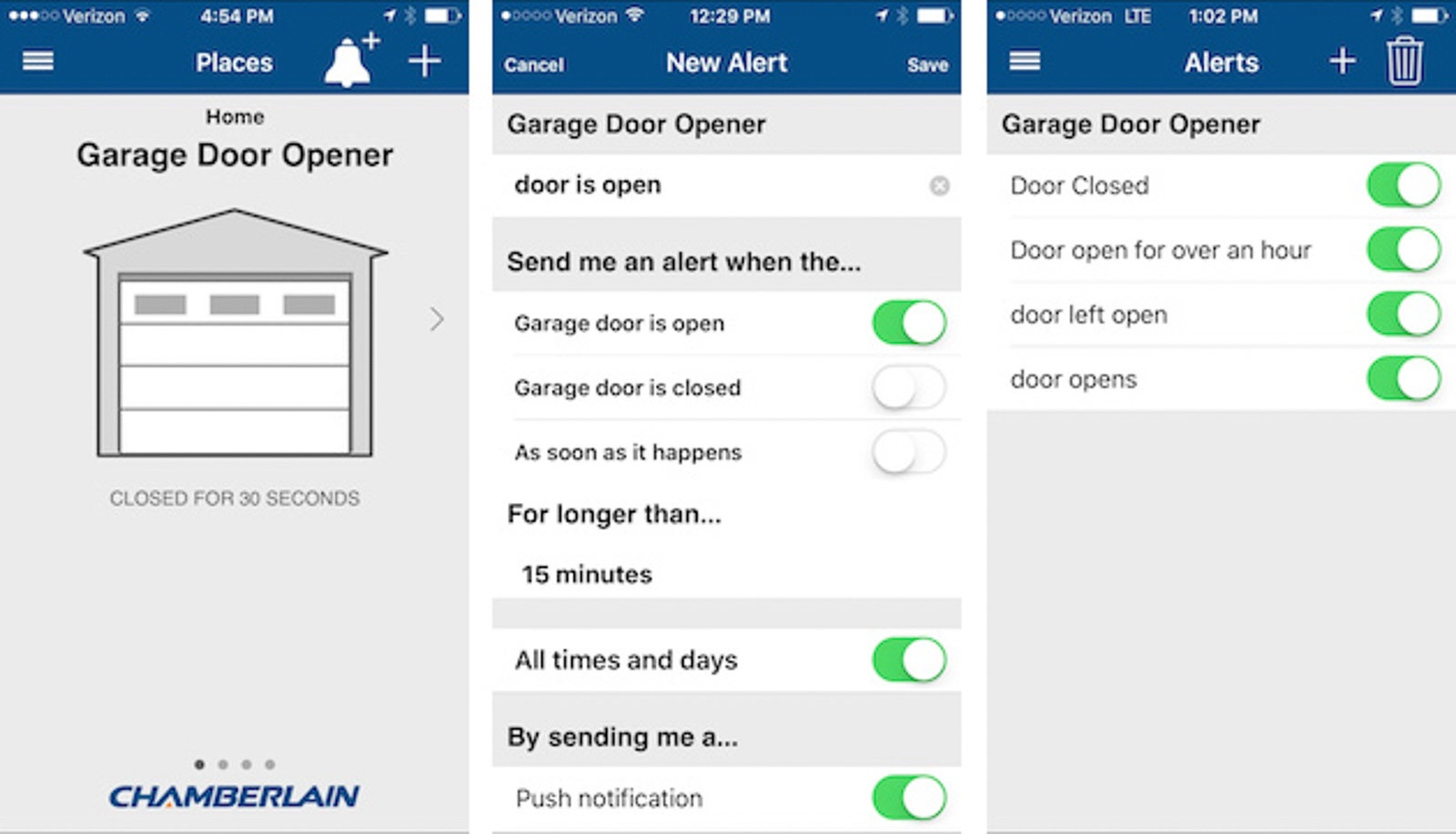
The MyQ app is simple and straightforward, with the main feature being the ability to create detailed alerts as to the status of your door. Photo: Jennifer Pattison Tuohy
For home-automation enthusiasts, the MyQ integrates with a variety of smart-home systems that give you extra control over your door and let you combine your door opening or closing with other smart devices in your home, for an extra price. To enable these you’ll need to purchase a smart home hub or pay a monthly subscription. Whether this is worth it for you depends on your needs and what smart home products you already have in your home.
The MyQ system is currently the only garage door controller that works with Apple’s HomeKit, so if you’re an iPhone owner, you can tell Siri to open and close your door from your phone or Apple Watch, and control it through the iPhone control panel. If you also have an Apple TV (third generation) or iPad in your home, you can add your door to the Apple Home “Scenes” and “Automations,” as well as have it open or close based on your location. For geolocation to work, however, you must respond to a prompt that appears on your device as you drive away or approach and unlock the phone, and then the door closes or opens. This is for security reasons, according to Chamberlain and Apple. To get these features, you need to buy and install a MyQ Home Bridge.
MyQ is also compatible with IFTTT and Google Assistant (as of September 2017). With IFTTT, you can use geofencing with no need for a hub, but you pay a $1-per-month fee, or $10 for the year to enable MyQ support. For this, you get the ability to link the opener to your other smart-home devices—such as lights, thermostats, and sprinklers—and set up “applets” to do useful things such as shut the garage door when the sprinklers start. It will also close the door automatically using geofencing, but it won’t open it for you. The same cost is associated with Google Assistant integration, which lets you use your voice, through Google Home or Google Assistant on your phone, to control the door. Functionality is also limited to closing the door with your voice, not opening it, and you can also ask Google for updates on whether the door is open or closed. In our testing, Google Assistant responded much more quickly than Siri to a request to shut the door when using both on an iPhone, but not being able to open the door with Google or IFTTT is disappointing, especially as it’s a service you are paying extra for.
We also tested the MyQ Garage with the Wink smart-home hub, adding it as part of a “Shortcut” routine that closed/opened the door and turned off/on the lights and thermostat when we pressed the Shortcut button in the Wink app. We were able to add the door to a geolocation-triggered automation (a “Robot” in Wink), so the door would shut and lights and other things would turn off when we left the house. We couldn’t add opening the door to one of these robots though (for what the app called “security reasons”).
Nest integration includes the Nest Cam and Nest Learning Thermostat. When you link the MyQ app to your Nest account, you get an icon for your thermostat and camera in the app; with one tap you can set your thermostat to Away or Home, access a video feed of your camera in real time, and get motion alerts. If you want to access previous footage, you can sign up for Nest Aware (starting at $10 a month or $100 a year), which gives you the ability to receive an alert if it senses a person, play back video recordings, and use the new Sightline feature to see snapshots of potentially important events.
MyQ also works with Xfinity and Alarm.com, although Chamberlain would not confirm the Alarm.com integration. If the claim is true, it would make MyQ compatible with a whole bunch of security systems, including LiveWatch, our top security system pick. MyQ is not compatible with Amazon’s Alexa or SmartThings, but as of April 2019 it does work with Amazon Key, which allows Prime members in certain cities to choose in-garage delivery at checkout. We have yet to try this service.
If you already have a Chamberlain or LiftMaster door opener installed, the MyQ Garage is the clear choice for you (most of the other controllers we tested probably won’t work with your opener). Also, if your opener is a 2013 model or newer, it is probably MyQ enabled already, so you’ll need to buy only the Internet Gateway for MyQ Enabled Garage Door Openers or the MyQ Home Bridge to get the remote functionality; at less than half the retail price of the MyQ Garage, these devices are definitely your cheapest option for retrofitting your door with smart controls. You can use this compatibility guide (PDF) to figure out what will work for your setup.
Flaws but not dealbreakers
False alerts have been an issue for some users. In our first round of testing, the device sometimes indicated that the door was open when it was actually closed, or vice versa; a number of our editors who have MyQ units in their homes have had similar experiences. Though these have not reoccurred in our long-term testing, we still recommend having video access to your garage door, which you can obtain through a Nest Cam or just an IP camera set up in your garage, if you’ll be opening and closing it remotely.
The MyQ doesn’t let you set up individual accounts, so if you want to let someone else use your smart garage-door controller, you have to share your username and password. You can’t assign keys to people, as you can with the Gogogate2 and Garageio; this might be a problem if you’re thinking of using it in a rental unit or an Airbnb place, or if you want to allow, say, a cable technician to come in through the garage when you’re not home. Multiple-user access would let you see who opened your door and when, so you could use it, for example, to check on a repairperson or see whether your child got home from school on time.
Smart Home integration is still not optimal, despite the recent option to upgrade to HomeKit. HomeKit is the only integration that lets you open the door remotely—all the others can only close it. This leaves Android users out of luck. Siri’s latency makes using Apple’s voice assistant as a voice replacement for a garage door remote unreliable at best. It worked well in strong Wi-Fi areas—such as immediately as we walked out the door to the garage. But as soon as Wi-Fi broke down it became useless, such as when the iPhone clung onto the weak Wi-Fi signal coming from the house as we pulled out of the driveway. Ideally, this is when HomeKit’s geofencing feature should kick in and shut the door automatically, but you still have to respond to a prompt on your iPhone to active it, leaving us a little unclear as to the real value here compared with just hitting the visor button.
Additionally, during testing, that prompt didn’t appear on our phone until we were four blocks away from the house (both on entry and exit), even though we set the geofencing radius as tight as possible. This meant the garage door was left open for at least a minute after we’d left and before we arrived. This isn’t just a HomeKit problem, however; it happened with all the apps that used geolocation, including IFTTT and Wink, making geolocation a useful backup for ensuring your door is closed, but not a reliable solution. The one thing we really liked about HomeKit is the quick access to the garage door through the control panel on an iPhone—much easier than having to open the MyQ app. Overall, the upgrade is only worth it if you already have an Apple Home hub and want to integrate multiple HomeKit smart devices with your door’s opening and closing.
We understand that Chamberlain’s restrictions on auto-opening are in the interests of protecting customers, and that opening the door with your voice or location are uncommon uses. But if these limitations chafe at you, and you want to do much more with your garage door and smart-home integration, the GoControl (our smart-home enthusiast pick) is your best bet.
Who else likes our pick
In a review, CNET writes that the MyQ Garage is “one of the most affordable smart garage-door openers, and also one of the easiest to install.” However, the site also points out the MyQ’s relative lack of smart-home smarts, touting the IFTTT and Echo integrations of the Gogogate2 and Garageio for people looking to do more with their door openers. CNET notes that Chamberlain’s decision not to allow such integrations comes down to concerns about the safety of allowing the cloud to operate your garage door without direct input from a person, something we understand as well, even if we can see why the restriction is frustrating for some people.
Tom’s Guide picked the MyQ Garage as its top smart garage-door controller, praising it for its wide compatibility: “MyQ can control nearly every garage door opener from all the major brands manufactured after 1993.”
A feature-packed upgrade
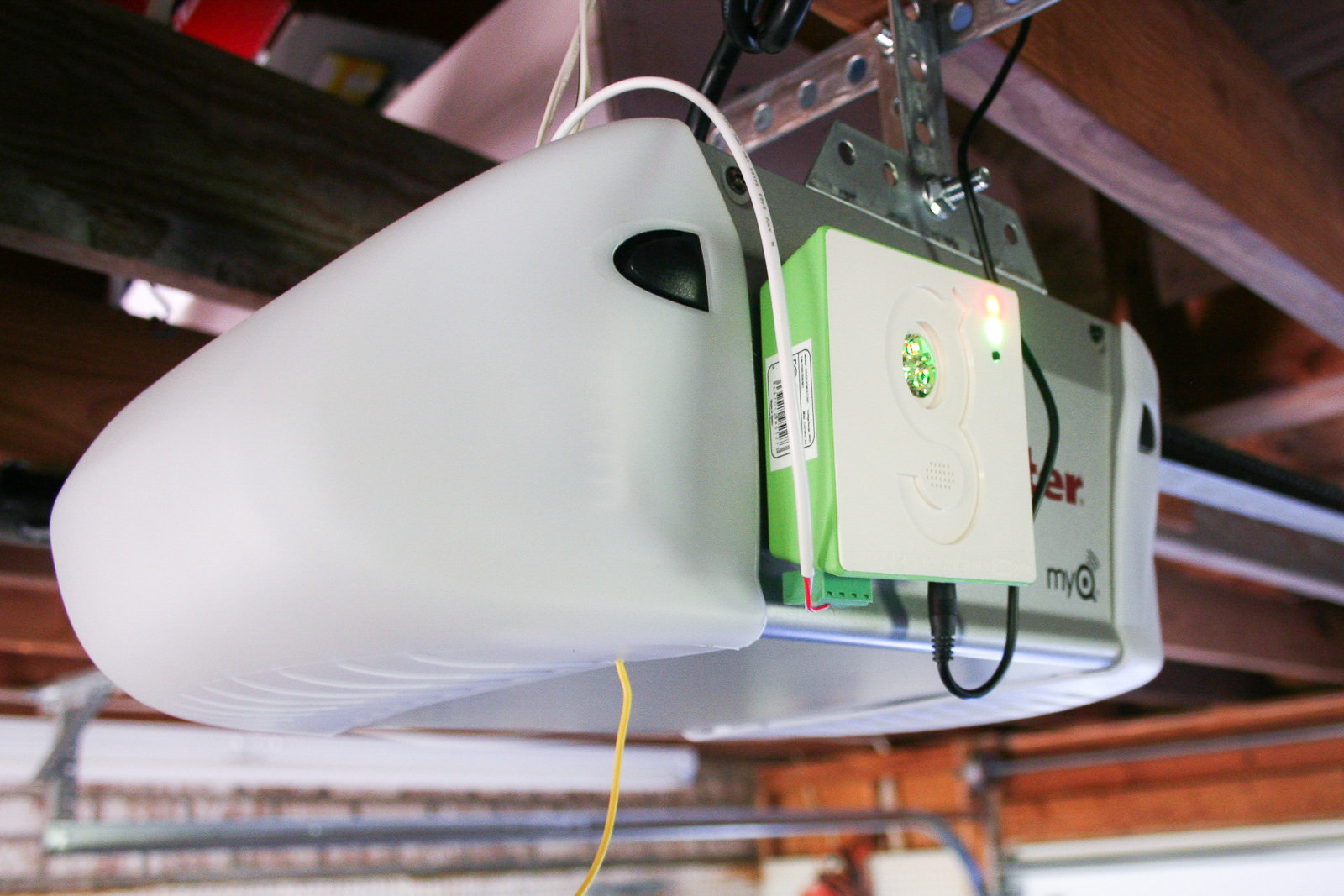
The Gogogate2 is a small, lightweight device that attaches to the side of your garage-door opener. Photo: Jennifer Pattison Tuohy
While the MyQ Garage will suit most people very well, if you have an older Chamberlain/LiftMaster door opener, or a different brand, and you’re looking for a bit more functionality than just opening and closing remotely, consider the Gogogate2. It is the most feature-packed garage-door controller we tested. It also has the best app interface, keeping you fully informed about what’s going on in your garage courtesy of clear, bright graphics, a temperature reading, and even a live visual of your garage door (if you choose to add an IP camera to your setup). And as the name implies, it also works with powered gates.
Another great feature of the Gogogate2 is the option for the main account holder to share access with individual people and control that access. Among the models we tested, this is the only one that offers the ability to assign users unlimited access, restricted access (certain days and times), or temporary access for one day, making it handy for admitting guests or technicians, or for letting in long-term and Airbnb renters. You can see who has accessed the garage and at what time through a calendar in the app, or you can play back video of the event (if you have a compatible camera installed). If your garage leads into your home, this system provides an excellent way of securely allowing people access while you’re not there.
Although the Gogogate2 doesn’t come with a camera, it is compatible with a wide range of cameras (PDF), but not with all of our top wireless-camera picks. A $30 fee covers three years of video integration, including real-time viewing and 1 GB of video storage. That’s substantially less than the Nest Aware subscription, but Nest Aware does offer more customizable alerts and other features. The Gogogate2 is not currently compatible with the Nest Cam.
If you want to add more functions and integrations, you can do so with the Gogogate2 without having to buy a separate home-automation hub, as you do with the MyQ Garage and the GoControl. With the free IFTTT app, you can fully automate your garage door’s opening and closing through a combination of voice and geolocation. During our testing, we were able to tell our Amazon Echo to open the garage door while we were in the house, after which we walked into the garage, got into the car, and drove away as the door closed behind us. Upon our return, the door sensed our approach courtesy of an IFTTT connection and opened; we drove into the garage, hopped out of the car, walked into the house, and told the Echo to close the garage door. IFTTT may not be for everybody, but during our trip, no button pushing of any kind was involved, nor did we need to get the phone out while driving. However, it too suffered from the issue of a too-wide geofence, not shutting the door until we were out of sight of the garage.
On the downside, the Gogogate2 had one of the more complicated installs of the devices we tested. It took about 45 minutes to set up, in contrast to 15 minutes for the MyQ Garage. This difference is due in part to the Gogogate2’s compatibility with a wide range of garage doors (the small installation book doesn’t cover them all, so we had to email support), and to the fact that the Gogogate2 employs multiple levels of security, including a separate login and password for remote access, which required a complicated dance between app, website, email, and back again. The option of a separate login for remote access means you can control your door locally only, if you don’t want access to your home to be available over the Internet.
The device does need to be wired into the back of your garage-door opener (as do all the others, apart from the MyQ Garage), and the Gogogate2 comes with a lot of wires. We needed to make another call to support to find out which ones we needed for our particular opener. If installing a controller into your opener is not an option, the Gogogate2 is the only model we tested that you can also wire into your push-button controller.
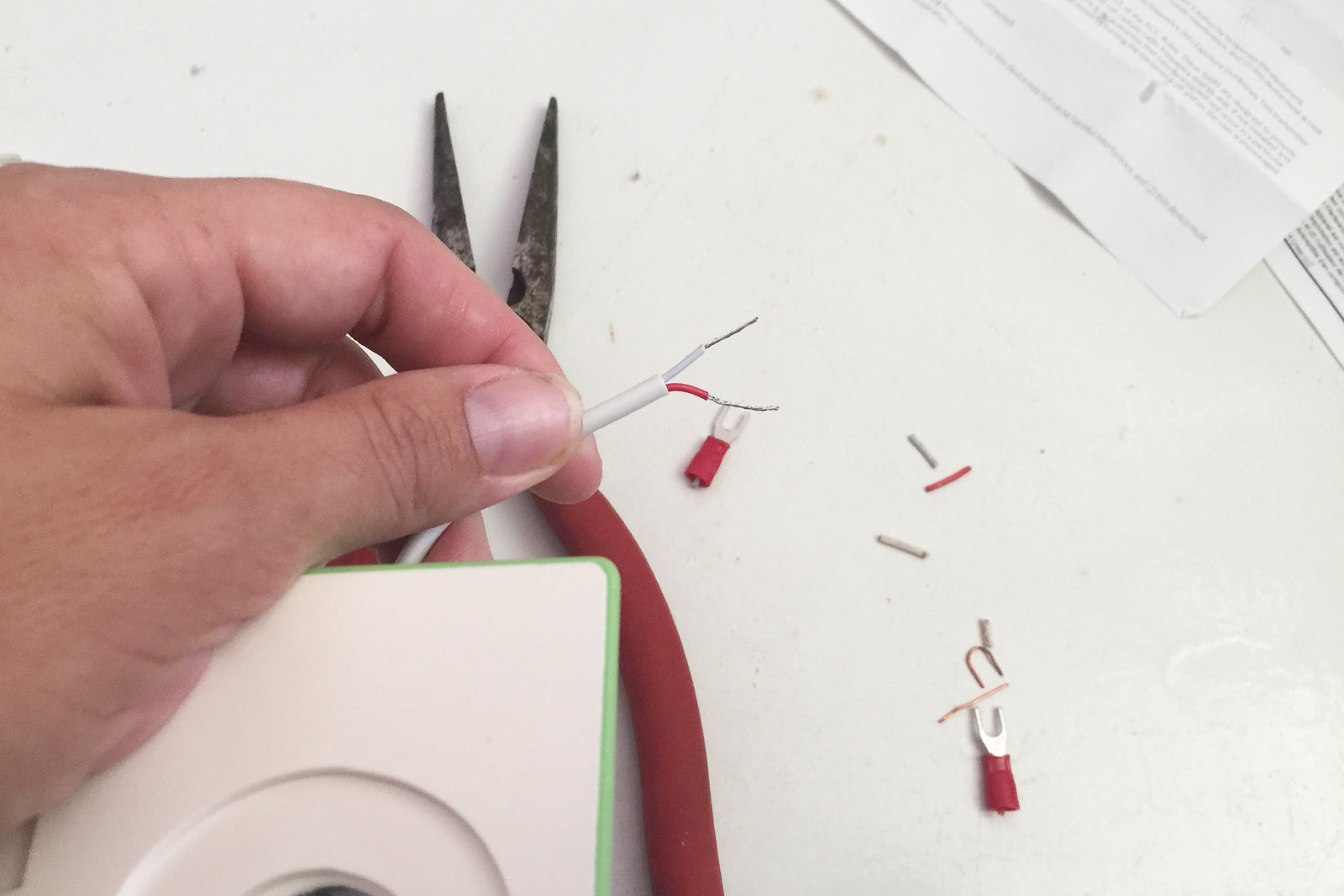
We had to get out our wire cutters to install the Gogogate2. Photo: Jennifer Pattison Tuohy
Once the device is installed, you need to attach the wireless sensor on the inside of your garage door, as with the MyQ Garage. (The Gogogate2 has an option for a wired sensor, too, something that is not available for the MyQ Garage.) The sensor also monitors the temperature inside your garage, which shows up in the app.
Both the physical and app setups were significantly more complicated for the Gogogate2 than for the MyQ Garage, but the extra steps are necessary because the device acts as its own server, not using the cloud at all. This design renders it independent and anonymous, so none of your personal data, aside from your email address, is stored on Gogogate’s servers. (The company, Remsol Europe, is based in Barcelona, Spain, and in New York City.) It also means you can control your door locally if your Internet connection goes down.
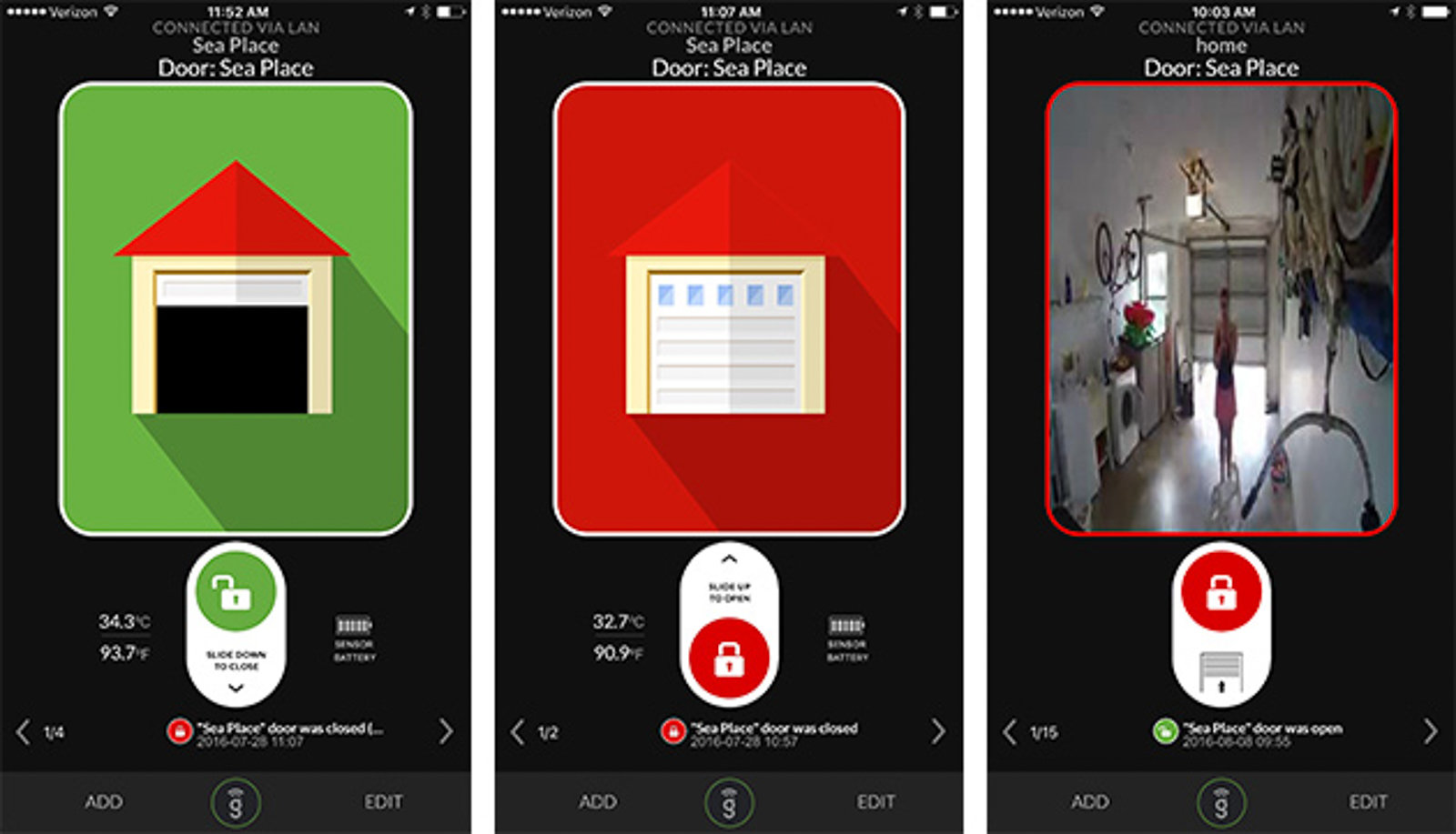
The Gogogate2 app’s opening page is clear and informative, showing the door’s status, a live feed (with a camera installed), the temperature, the battery status, and a feed of recent events. Photo: Jennifer Pattison Tuohy
The Gogogate2 app is similar to the MyQ app in that you swipe up to open and down to close. It’s a little more colorful, which we liked, but beyond the front page the app gets less user-friendly, and the small font on the settings page seems more suited to the available Web interface than a mobile app. The app also doesn’t offer as many options for alerts as MyQ does. You can’t set custom alerts; you have only the option of three preset ones. You can use IFTTT to set the Gogogate2 to close the door at a standard time every day (for example, 10:30 p.m. every night, so you can be sure it’s closed when you go to bed), but that’s the extent of its smart-home integration.
IFTTT will link your device to Amazon’s Echo to enable voice control, but as of now everything goes through IFTTT. And while IFTTT’s geolocation feature is pretty cool, it is by no means perfect, and we wouldn’t leave the security of our home in its hands. When we tested the automatic-close function, the door didn’t shut until we drove out of sight, even though we had set the location as tightly as possible on the driveway. This IFTTT recipe would work as a good backup if you do forget to close your door, but we’d still plan to hit the visor button or close the door using the app on our way down the street.
For smart-home enthusiasts
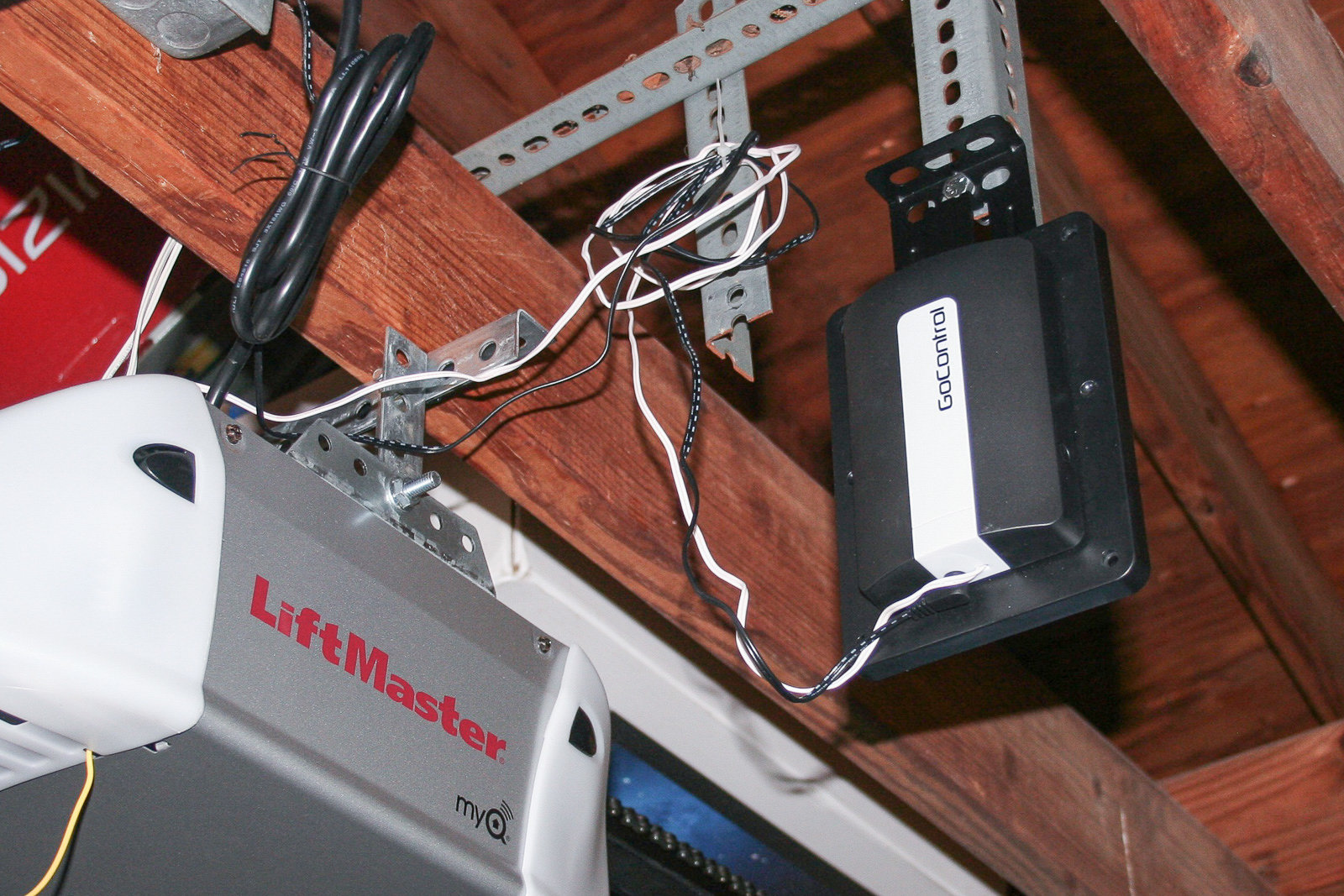
The GoControl’s option to mount the device onto the garage door’s hardware makes installation a lot easier. Photo: Jennifer Pattison Tuohy
The GoControl/Linear Z-Wave Garage Door Opener Remote Controller may have the least catchy name ever, but it does what it says on the box very well and with no restrictions, if you choose the right home-automation system to pair it with. It’s a great choice for a smart-home enthusiast who enjoys setting up routines and integrating the control of their garage door with all their other Z-Wave smart-home devices (of which there are many—here’s a PDF list of some compatible GoControl ones). It is not a good choice if you just want to open and close your garage door remotely, as you need a separate home-automation hub for it to function, and no stand-alone app will work with the GoControl device by itself.
The GoControl device is compatible with all Z-Wave–capable hubs, including but not limited to those from Insteon, Nexia, SmartThings, Vera, and Wink. It is also the smart garage-door controller of choice for most home-automation package systems, such as ADT Home Security, Alarm.com, AT&T, Honeywell, and iControl. The GoControl is a popular device and has sold more than a quarter of a million units since it launched in 2013. A big advantage of the Z-Wave control versus the MyQ Garage’s reliance on Wi-Fi is that you have local control, so if your Internet goes down, you can still control your door from around the home.
Physical installation is similar to that of the Gogogate2 and requires a bit of wiring as well as pairing with your home-automation hub. (Tip: Pair it before you wire it to the opener, unless your hub happens to live in your garage.) You also don’t need to drill into the ceiling (although that is an option if you want). The engineers behind this device came up with an ingenious way to mount the bracket on your existing garage-door hardware using just a couple of supplied bolts, making installation a lot easier.
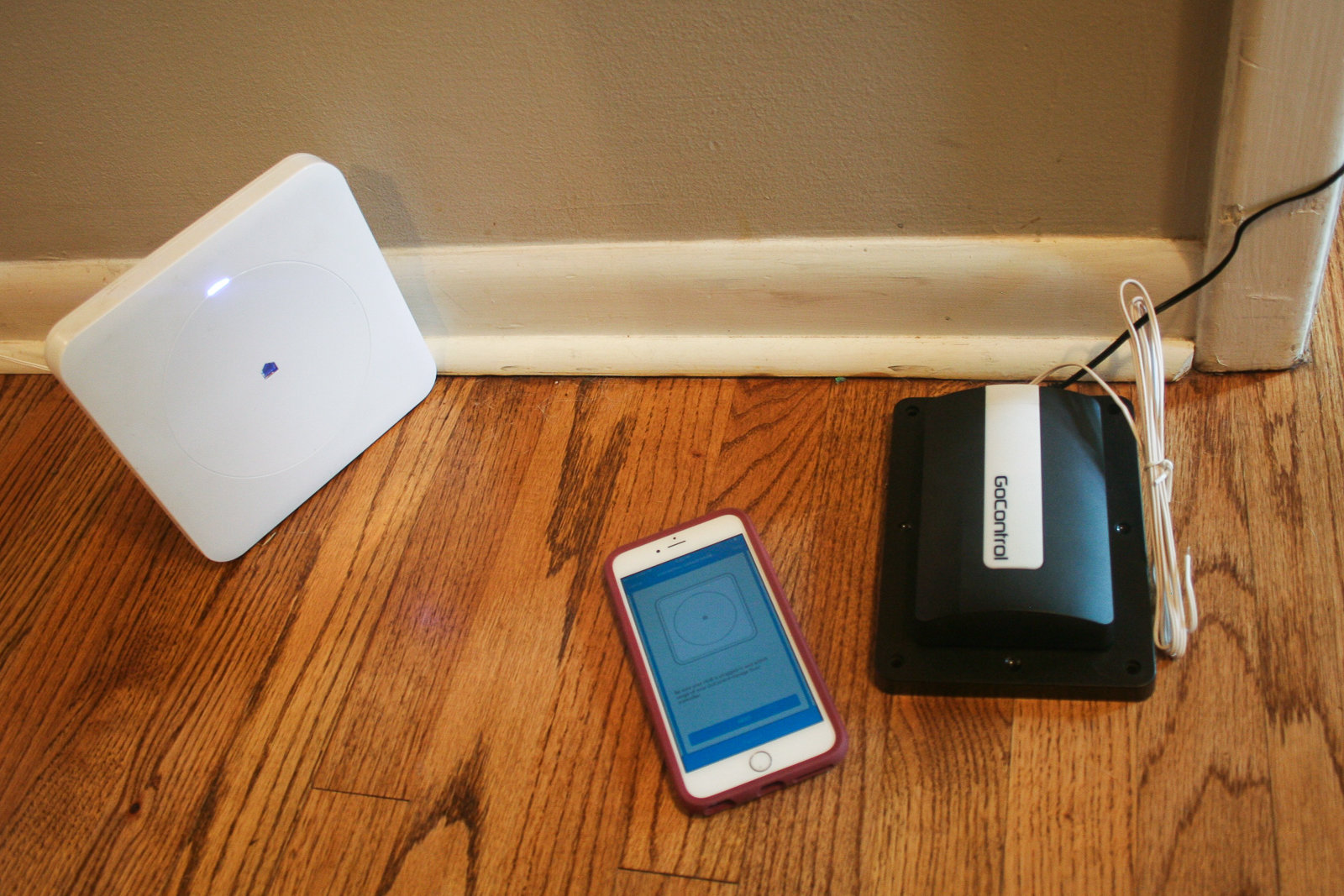
Be sure to pair the GoControl with your home-automation hub before you wire it to your garage-door opener. Photo: Jennifer Pattison Tushy
We tested the GoControl with the Wink Hub and the Wink app. Within the app you can open and close the door by swiping up and down on a graphic of a garage door, as well as create customizable alerts that indicate when the door opens or closes and for how long it’s been open. You can also use Wink’s Robots to automatically shut the door when you leave based on geolocation, or if the door has been open for more than an hour (something that the MyQ system will not let you do through Wink). However, you can’t use Robots to automatically open the door on your arrival. Instead, as with the MyQ Garage, you have to use Wink’s Shortcuts, which differ from Robots in that you must push a button in the app to activate them. This is a function of Wink’s software; the app says that “to protect the security of your home ‘open’ is not an option for Wink automation.”
If you want more control over your GoControl door opener, you’ll need to use a different system. The folks behind GoControl told us that the Vera hub is the most open, letting you do neat things such as automatically shut your door if it starts to rain. The Vera device also uses local processing and is not reliant on the cloud.
What to look forward to
At the CES 2018 trade show, Skylink announced the Nova, a smart garage-door controller that you can retrofit to most existing controllers. You can open or close your door remotely via the accompanying app or with your voice because the Nova is compatible with Alexa and IFTTT. In addition to also being a light fixture, it promises to detect when in-home alarms from smoke and carbon monoxide detectors go off and to automatically open the garage door to aid in ventilation. Retailing for about $100, the Nova is due out in spring 2018.
The competition
Garageio
The Ohio-born, Kickstarter-grown Garageio is a promising device that unfortunately still feels like it’s in beta. In our testing we ran into a couple of key issues that keep us from feeling comfortable recommending it, especially as it currently costs at least $60 more than any of the other options. However, the people behind the Garageio told us that version 2 is in beta testing right now, due for release in early 2017. It promises to integrate with virtually all garage doors (compatibility is pretty limited at the moment), and it will be smaller with a simpler hookup—a much-needed improvement, as this was by far the most difficult installation we did. Installing it took over an hour, mostly because of its wired connection for the sensor, which required routing cable across the garage. Also, some steps were not well illustrated in the manual, and a couple of them were missing completely.
According to the Garageio’s makers, version 2 will incorporate the geofencing capabilities currently offered through IFTTT right into its own app, which would be a standout feature that no other device has, making the price difference with the competition (it starts at $200) more palatable. We will test this version when it’s released, and provide an update.
What we liked about the current version is its wide integration with home-automation systems, including Echo, IFTTT, Stringify, and (coming sometime in 2016) SmartThings. This integration allows you more customization of your garage-door interaction, including integration with other smart routines in your home, as well as opening and closing the door based on geolocation through IFTTT and your voice, courtesy of the only direct integration with Amazon’s Echo (which means you can also ask Alexa if your door is open or closed). A newly released Apple Watch app (August 2016) and TouchID as an option on the app might make Garageio attractive to you if you use iOS.
The Garageio is one of only two controllers we tested that allow for multiple user accounts, but unlike with the Gogogate2, you can’t give limited-time access to a user with the Garageio; instead, you have to manually delete them. You can do all of this using the Garageio Web interface, however, which makes the process a little simpler. We also liked that the Garageio door sensor is wired rather than wireless, which we think will produce fewer issues where the app shows the wrong status, as happened with the MyQ app on occasion.
However, the Garageio app is limited, and the alerts setting is too simple, offering just on or off indicators with no explanation as to what alerts you are getting (we learned that you get alerts when the door opens or closes, and when it’s been open for an undetermined period of time). In addition, the app is compatible only with iOS 9.1 or later (MyQ’s minimum is iOS 8, while Gogogate2’s is iOS 7), which turned out to be an issue in our testing because one member of the household had an iPhone running iOS 8. On top of that, it gives no warning when you open or close the door remotely, which is a significant safety issue and means the device is not UL compliant. The makers of the Garageio say that they are shooting for UL compliance with version 2. As it stands, however, considering the assorted problems, this device is not worth its high price tag.
Wrapping it up
After spending the better part of two months up close and personal with smart garage-door controllers, we think the biggest takeaway is this: Getting an alert when you’ve left your door open is an invaluable security tool, totally worth shelling out a hundred or so bucks for.
We also really like the concept of geofencing letting the door “magically” open as you arrive and close as you leave, but in practice, too-large geofencing radiuses make this a real security risk. As we drove around our test neighborhood, our HomeKit and IFTTT-enabled MyQ opener sent numerous notifications asking if we wanted to open or close the door. If we hadn’t had to answer the notifications to make it open, the door would’ve been dancing! Until this functionality is improved, it isn’t a feature that we recommend for most people.
However, if you want to know whether you left your door open and then be able to close it, you just can’t go wrong with the MyQ Garage. Apple HomeKit and Google Assistant integration mean you can also use your voice to close your door (and open it with HomeKit)—a neat feature when you’re in your house, but not a giant step up from the visor-button when you’re driving. If you crave automatic open/close features plus the ability to securely control other people’s access to your home, the Gogogate2 is your best bet.
This guide may have been updated by Wirecutter. To see the current recommendation, please go here.
When readers choose to buy Wirecutter’s independently chosen editorial picks, Wirecutter and Engadget may earn affiliate commissions.